AI vision assistant for blind and low-vision people

Point your phone. Hear what's in front of you.

Beamfy describes your surroundings, reads printed text aloud and reads you walking routes. It's made for VoiceOver and TalkBack.

Free to download. 7 days of full access, then 5 free descriptions or readings every day.

Beamfy assists you. It doesn't replace your cane, your guide dog or your own judgment.

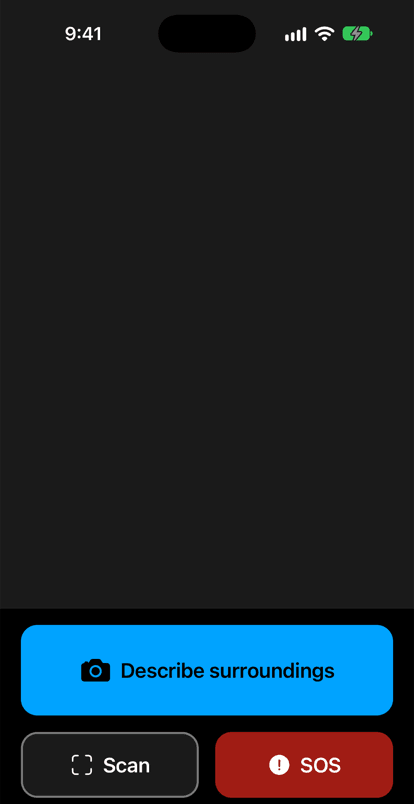
The Beamfy home screen on iPhone, in English. The camera view fills the top. Below it is a large blue button, Describe surroundings, and under that two buttons: Scan and a red SOS button.
Example of a spoken answer

Careful: there's a step down about one meter ahead. Beyond it, a pedestrian crossing. On your right, a café with its door open. I can't read the sign above the door clearly.

Illustrative example. Real answers depend on your photo.

  • Made for VoiceOver and TalkBack
  • 74 languages
  • SOS, always free

How it works

Three steps. You don't need to look at the screen.

  1. Point

    Open Beamfy, hold up your phone and press the large button. Beamfy takes a photo of what's in front of you.

  2. Beamfy looks

    The photo is sent securely and analyzed by AI. Possible hazards come first, and Beamfy says plainly when it isn't sure.

  3. Listen

    You hear the answer in your language. Take another photo whenever you want to know more.

What Beamfy does

Everyday tasks, done by voice. Each one comes with its limits, stated plainly.

Describe your surroundings

Take a photo and hear what's there and where it is: doors, steps, furniture, people, objects. Possible hazards come first. When Beamfy isn't sure, it tells you instead of guessing.

Example of a spoken answer

You're in a hallway. Careful: a chair is in the middle of the floor, about two steps ahead. There's a door at the end on the left. I can't tell if it's open.
Read printed text aloud

Signs, labels, letters and menus. Beamfy reads the words exactly as they're written. Need them in another language? Ask for a translation.

Example of a spoken answer

The label says: Whole milk. 1 liter. Best before October 14.

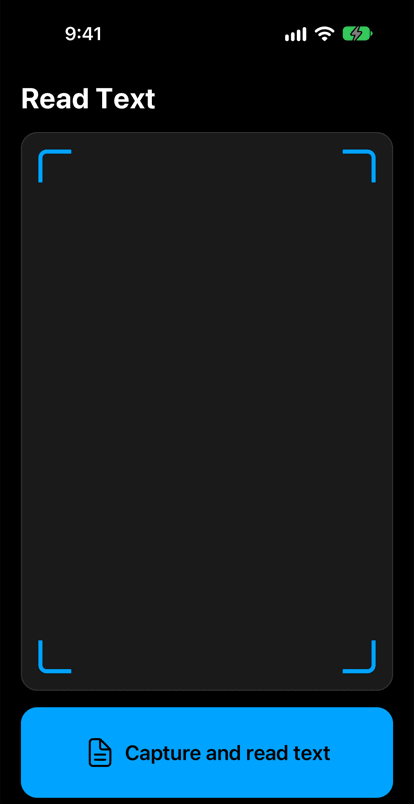
The Beamfy Read Text screen on iPhone, in English. A camera frame with blue corner marks fills most of the screen. Below it is a large blue button: Capture and read text.

Hear the walking route before you go

Say or type where you want to go. Beamfy finds the place and reads you the walking route, step by step, before you set off. It's a preview, not live guidance: it doesn't follow your position as you walk, and it doesn't detect obstacles.

Example of a spoken answer

Central Library, about 650 meters away. Step 1: head north on Park Street for 200 meters.

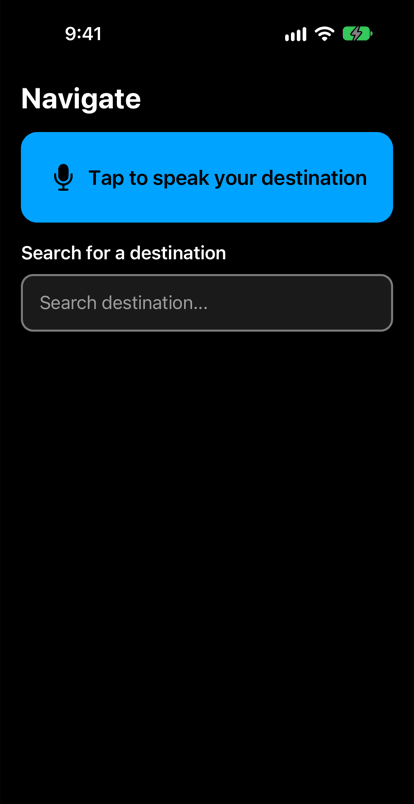
The Beamfy Navigate screen on iPhone, in English. At the top is a large blue button, Tap to speak your destination. Below it is a search field to type a destination.

Real screens from the Beamfy app on iPhone, shown in English.

Made for VoiceOver and TalkBack

Labeled buttons, spoken results and a large main button. Use Beamfy with the screen reader you already know, on iPhone or Android.

74 languages

The app and its answers are available in 74 languages. Answers are read aloud by your phone's built-in voices, so which languages can be spoken depends on your device.

Beamfy assists. You decide.

AI can make mistakes. Use Beamfy as one more source of information, alongside your cane, your guide dog, other mobility aids and your own judgment, especially near traffic, stairs, platforms or water. Beamfy is not a medical device.

SOS: exactly what happens

SOS alerts a person you trust. It's free for everyone, always, with or without Premium.

  1. A 10-second countdown

    After you press SOS, Beamfy counts down for 10 seconds. One tap on Cancel stops it, so a press by mistake sends nothing.

  2. A text to your contact

    Beamfy sends a text message to the emergency contact you chose in the app, with your location when your phone can share it.

  3. You decide whether to call

    Beamfy then offers to dial your local emergency number for you. Making that call is up to you.

What SOS doesn't do

  • Beamfy doesn't contact emergency services. In an emergency, call your local emergency number.
  • The text needs a mobile signal and your contact's correct phone number.

Add your emergency contact in the app: Settings, then Emergency contact.

For families and instructors

Helping someone get started with Beamfy? Here's what to know.

Family and friends

Help install Beamfy and choose the app language together. Then add yourself as the emergency contact: if they press SOS, the text with their location comes to you.

Orientation and mobility instructors

Beamfy can be one more tool in training: describing a scene, reading print and previewing a walking route before a trip. It doesn't replace cane or guide dog skills, and it doesn't guide a route live.

Schools and organizations

Introducing Beamfy to the people you support? Write to us at [email protected]. We're glad to answer questions and to hear what would help.

Before you start

  • An internet connection: Beamfy doesn't work offline.
  • The screen reader already on the phone: VoiceOver on iPhone, TalkBack on Android.
  • A phone voice for the chosen language. Answers are spoken by the phone's own voices.
  • An emergency contact who has agreed to receive SOS texts.

Your privacy, in plain language

What happens to your photos and your data. The full details are in our privacy policy.

Your photos

Photos are sent encrypted to our servers and then to an AI provider to be analyzed: OpenAI, or Anthropic as a backup. Beamfy doesn't store your photos. The AI providers may keep request data for a limited time to check for abuse, under their own policies.

30 days, then deleted

Descriptions, recognized text and the approximate location attached to a request are kept for 30 days at most, then deleted. If you delete your account, they're deleted straight away.

No face recognition

Beamfy doesn't recognize faces and doesn't process biometric data.

Location only when you ask

Your location is sent only when you use SOS or navigation.

Your voice

Voice input is handled by Apple's or Google's speech recognition, on your phone where it supports this. Beamfy doesn't store audio.

This website

No cookies, no tracking and no analytics.

Accessibility

This website aims to meet WCAG 2.2 at level AA. We keep improving the accessibility of the app, and we want to hear about anything that gets in your way: [email protected].

Honest pricing

Start for free. Pay only if you need more than 5 a day.

Free

$0 to download

  • 7 days of full access after you sign up
  • Then 5 descriptions or readings every day, for free
  • SOS, always free

Premium monthly

$4.99 per month

  • Unlimited descriptions and readings (fair-use limits apply)
  • SOS, always free
  • Prices are shown in US dollars. Local prices vary by country or region and are shown in the App Store or Google Play before you buy.
  • Subscriptions renew automatically until you cancel. You can cancel at any time in your App Store or Google Play account settings.
  • Unlimited means unlimited for normal use: daily fair-use limits apply. The free daily allowance resets at midnight, your local time.
  • SOS is free for everyone, with or without a subscription.

Questions and answers

Is Beamfy free?

Yes, Beamfy is free to download. After you sign up, you get 7 days of full access. After that, you can use 5 descriptions or readings every day for free, or choose Premium for unlimited use. SOS is always free.

What does "unlimited" mean?

Premium is unlimited for normal use. To keep the service fair for everyone, daily fair-use limits apply: 300 descriptions or readings a day with Premium, and 60 a day during the 7 days of full access after you sign up. Without Premium, you get 5 a day for free. Daily allowances reset at midnight, your local time.

Does Beamfy replace a cane or a guide dog?

No. Beamfy gives you extra information from a photo, and AI can make mistakes. Keep using your cane, your guide dog or other mobility aids, and your own judgment.

Does it work with VoiceOver and TalkBack?

Yes. Beamfy is made to be used with VoiceOver on iPhone and TalkBack on Android. If something doesn't work well with your screen reader, please tell us at [email protected].

Which languages does Beamfy speak?

The app and its answers are available in 74 languages. Answers are read aloud by the voices built into your phone. If your phone has no voice for your language, you may be able to add one in your phone's settings.

What happens to the photos I take?

They're sent encrypted to our servers and then to an AI provider to be analyzed: OpenAI, or Anthropic as a backup. Beamfy doesn't store your photos. The text of the answer is kept for 30 days at most, then deleted.

Does Beamfy call emergency services?

No. When you press SOS, Beamfy counts down for 10 seconds, then texts your location to the emergency contact you chose in the app. It then offers to dial your local emergency number, but you make that call yourself.

Does Beamfy guide me while I walk?

Beamfy reads you the walking route step by step before you set off. It doesn't follow your position as you walk, and it doesn't detect obstacles.

Does Beamfy work without an internet connection?

No. Descriptions, reading and walking routes need an internet connection, over mobile data or Wi-Fi.

Can Beamfy recognize people I know?

No. Beamfy doesn't do face recognition and doesn't process biometric data.

Can I set up Beamfy for someone else?

Yes. Help them install it on their own phone, sign in and choose their language. If they agree, add yourself as their emergency contact so that their SOS text reaches you.

Is Beamfy a medical device?

No. Beamfy is an everyday assistance app. It isn't a medical device and doesn't diagnose, treat or monitor any condition.

How do I delete my account?

In the app, go to Settings, then Delete account. You can also email [email protected] from the address you signed up with. Deleting your account doesn't cancel a subscription: cancel it in your App Store or Google Play settings.

Get Beamfy

For iPhone and Android. Free to download, with 7 days of full access.